
I’m super excited to chat with you about something really cool you can do in Midjourney. Instead of asking the AI to output regular pictures, we’re going to get it to do something called ASCII art. ASCII art is like making pictures using letters and symbols you find on your keyboard. It’s a fun way to turn simple text into amazing art.
I’ve been playing around with Midjourney, exploring all the fantastic things it can do, and I’ve discovered some tricks for making incredible ASCII art. It’s like a game where you use special codes to tell Midjourney exactly what kind of picture you want to make, and then, poof! It creates it out of letters and symbols.
So, why am I telling you all this? Because I want to share with you how you can do it too! We’re going on an adventure together to learn about Midjourney and how to make your own ASCII art. Whether you’re new to this or you’ve tried making ASCII art before, I promise we’ll have a lot of fun.
Let’s get started on this creative journey and unlock the magic of turning simple text into beautiful pictures. Ready? Let’s go!

Understanding Midjourney Versions
Let’s quickly talk about something really important before we start creating art: understanding the different versions of Midjourney.
Think of Midjourney like a video game. Over time, it gets updates or versions that make it better and more fun. Each version has its own special features, just like how each level of a game offers new challenges and rewards.
The Basics of Midjourney Versions
Midjourney has several versions and each version might be a little different, like having a secret recipe that changes slightly every time to make the cake even more delicious.
What Version of Midjourney Should I Use for ASCII Art?
To make awesome ASCII art, we need to choose the right version of Midjourney. I’ve been playing around to find this out for you. The version you need to select to get the best results is version 4. Older versions look terrible. Versions 5 – 6 tend to remove the ASCII part of the result.
How to Check and Select Versions
When you’re getting ready to make your art, Midjourney lets you choose which version you want to use. All you have to do is the following:
- In discord – Just type –v 4 at the end of your prompt. /imagine [PROMPT] –v 4
- In Midjourney Alpha – Click the prompt settings icon on the far right of the prompt bar and navigate to ‘version’ then select ‘4’.
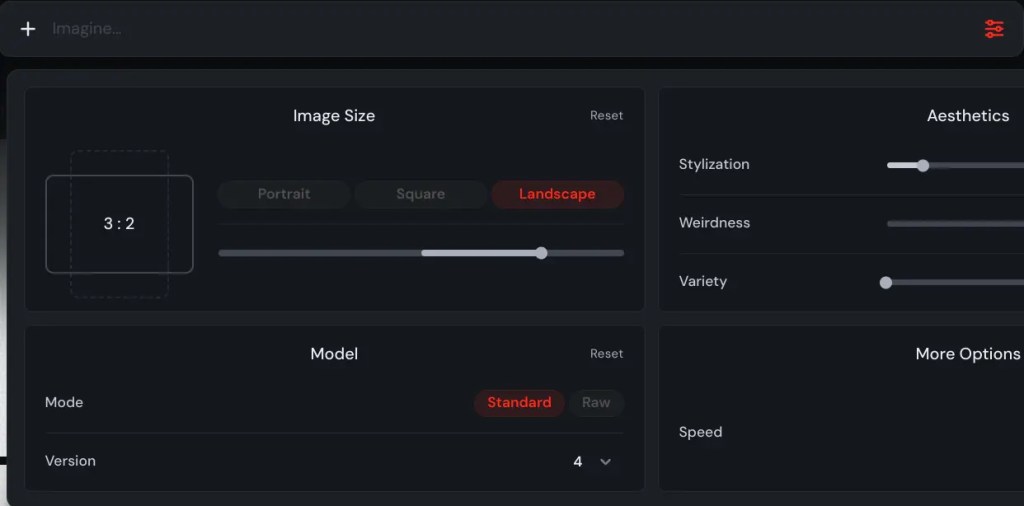
With the version 4 of Midjourney, we’re going to make some amazing ASCII art together. It’s going to be a blast, and I can’t wait to show you how!
Next up, we’ll get everything set up and start turning those imaginative ideas into real ASCII art. Are you excited? I sure am! Let’s keep this creative party going!
Crafting Effective Prompts for ASCII Art
With Midjourney, if we use the right words, we can create some pretty amazing art using just letters and symbols. Let’s see how we can do this!
The Magic of Precise Prompts
Imagine you’re asking for a drawing, but you can only use words. If you’re super clear and specific, you’ll get exactly the picture you’re dreaming of.
That’s how it works with ASCII art in Midjourney. The clearer your prompt, the cooler your art will look. It’s like magic!
Tips for Crafting Awesome ASCII Prompts
- Be Specific: It’s like telling a story. The more details you give, the better the picture.
- Use ASCII Art Keywords: Words like “text-based,” “ASCII art,” or “character art” tell Midjourney exactly what style you’re aiming for.
- Describe the Scene or Object: Think about what you want to see. Is it a cat, a spaceship, or maybe a haunted house? Tell Midjourney!
- Mood Matters: Adding a mood, like “happy,” “spooky,” or “mysterious,” helps Midjourney understand the vibe you’re going for.

Examples of Successful Prompts
Basic Examples for Beginners
- “A smiling sun in ASCII art”
- “Text-based drawing of a cat sitting”
- “ASCII art of a small house on a hill, simple”
These prompts are perfect for starting out. They’re clear and tell Midjourney just what we’re looking for.
Advanced Prompts for More Complex ASCII Art
- “Detailed ASCII art of a dragon breathing fire, with scales and wings, in a mystical forest setting”
- “Character art of a futuristic cityscape with flying cars, neon lights, and towering skyscrapers, using symbols and letters”
- “Complex ASCII representation of a knight battling a giant troll, focusing on texture and motion details”
These advanced prompts dive deeper, adding layers and textures to challenge Midjourney and create more detailed art.
Why It All Matters
The right prompt is like a map to treasure. It guides Midjourney to create exactly the kind of ASCII art you’re imagining. Whether you’re just starting or ready for a challenge, the right words can make your ASCII art journey exciting and full of surprises.
Now that we know how to craft prompts that make Midjourney tick, let’s get ready to turn those words into incredible art. I can’t wait to see what you’ll create!

Tips and Tricks for Enhancing ASCII Art Quality
Creating ASCII art with Midjourney is like going on a treasure hunt. Sometimes, you find the treasure right away, and other times, you need to follow a few more clues. But don’t worry! I’ve got some awesome tips and tricks to help you enhance the quality of your ASCII art and make each piece a masterpiece.
Advanced Settings and Parameters
Midjourney is super smart and has some hidden tricks up its sleeve. By tweaking a few settings, you can make your ASCII art even more amazing:
- Stylisation: Setting this to 0 sticks to the prompt without adding any extra artistic values. Set it to 1000 and Midjourney will take your prompt and then add loads of extra artistic style to it.
- Weirdness: Change this from 0-100 and add offbeat and quirky qualities to the output images.
- Variety: Playing with this setting from 0-100 will add unexpected and unusual results to the composition of your image.
Refining Prompts for Better Results
If your first piece of art isn’t quite what you imagined, think of it as a rough sketch. Here’s how to refine it:
- Analyze the Output: Look at what you like and what you don’t. Is it too busy, too simple, or just off-topic?
- Adjust the Details: If the art is too cluttered, try simplifying your prompt. If it’s too simple, add more details or ask for complexity.
- Iterate: Use words from your initial output that you liked to refine your next prompt. It’s like honing in on the treasure.
Editing and Enhancing Your ASCII Art
Once you have your ASCII art, you might want to tweak it a bit to make it perfect. Here are a few ways to do that:
- Manual Tweaks: Sometimes, all it takes is removing or adding a few characters. Open your art in a text editor and play around with it.
- Contrast and Brightness: If you’re using software to display your art, adjusting the contrast and brightness can make it more legible.
Using Software for Enhancements
For those who want to take their ASCII art to the next level, there are tools out there designed for text-based art editing:
Convert your ASCII art into an image and use image editing software to adjust things like contrast, brightness, and even color.
Wrapping It Up
Enhancing ASCII art is all about experimenting and having fun with the process. Whether you’re tweaking settings in Midjourney, refining your prompts, or putting the finishing touches on your art manually, each step is an opportunity to improve your creativity. So go ahead, play around with these tips, and watch your ASCII art transform from good to wow!

Conclusion
And there we have it, a journey through the whimsical world of creating ASCII art with Midjourney!
From understanding the different versions of Midjourney to crafting precise prompts, and finally enhancing the quality of our art, we’ve covered a lot of ground together.
Remember, the key to great ASCII art is experimentation and creativity.
Each prompt you craft and every tweak you make is a step toward mastering this unique form of digital art. Midjourney is a powerful tool, but your imagination is the real magic behind every piece of art you create.
Don’t be afraid to try new things, mix up your prompts, or play with the settings. The beauty of ASCII art is that it’s a blend of technology and creativity, offering endless possibilities for expression. Whether you’re a beginner just starting out or an experienced artist looking to try something new, the world of ASCII art is open for you to explore.
So grab your digital pen, summon your inner artist, and dive into the endless possibilities that Midjourney and ASCII art have to offer. Share your creations, learn from others, and most importantly, have fun. The journey of creativity is endless, and I can’t wait to see the amazing ASCII art you’ll create.
Happy creating, and here’s to the many AI artistic adventures that lie ahead!