
In today’s digital age, watermarks are commonly used to protect the intellectual property of images and videos. However, there are times when you might need to remove them, either for aesthetic reasons or to repurpose content. In this article, we’ll explore a simple method to remove watermarks, specifically focusing on content from Pika Labs.
Understanding Pika Labs and its content
Before diving into the removal process, it’s essential to understand the platform in question. Pika Labs is a platform that currently offers free content that users can utilize in any manner, even for commercial purposes. But please note that all good things eventually come to an end, meaning Pika Labs might introduce a paid subscription model in the future. If you’re using the watermarked content commercially, be aware of the potential risks. There’s uncertainty about whether Pika Labs might take retroactive action against users.
Step-by-step guide to removing watermarks from your Pika Labs videos
1. Choose Your Content: For our demonstration, we’ll use a video clip of a warrior on a battlefield. We obviously created this first in Pika Labs.
2. Introducing the Watermark Remover Tool: There are several tools available for removing watermarks, but for this guide, we’ll use the free tool AniEraser. This tool is available online, but there’s also an app version if you prefer.
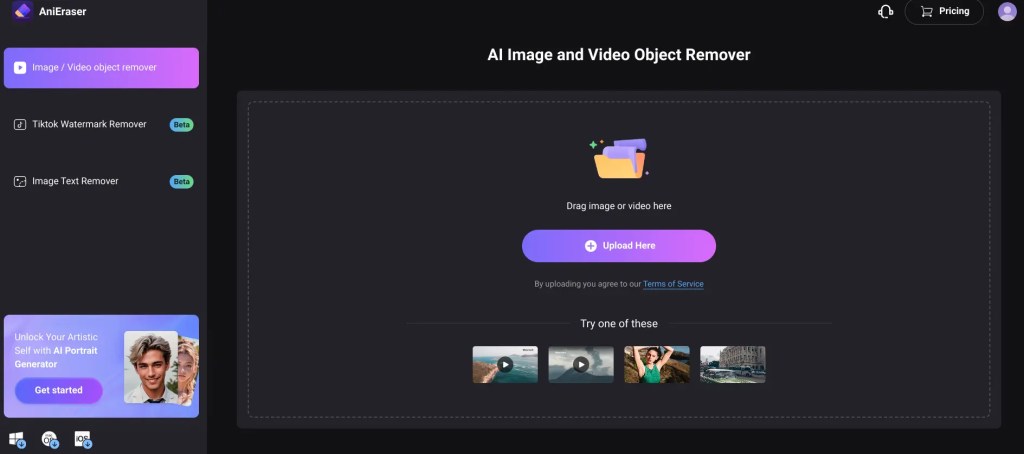
3. Upload Your Content: Navigate to the button that says ‘Upload Here’ in the tool and upload the image or video with the watermark.
4. Select the Watermark Area: Once uploaded, drag the brush tool over the watermark area.
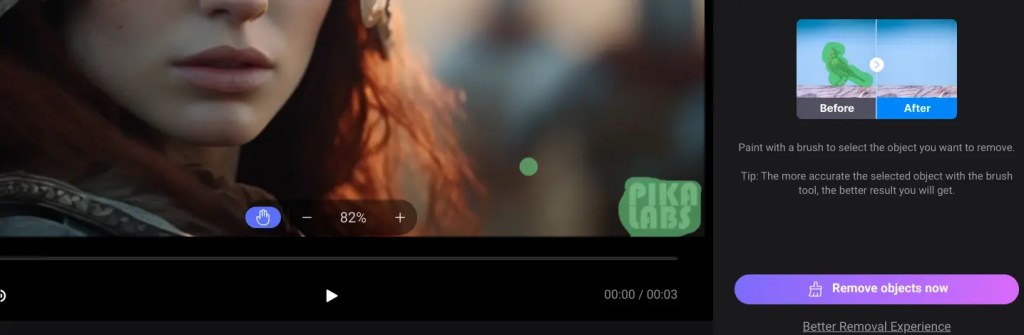
5. Process the Removal: After selecting the watermark area, click on “Remove objects now”. The tool will process the removal, and in a short while, your content will be free of watermarks.
6. Download: After the tool has processed the video or image you just need to select ‘download’ and save your watermark free video to the folder of your choice.
Evaluating the results
Compared to other watermark removers, AniEraser does a superior job. It does not seem to leave any ‘blur’ or artefacts behind. Please go ahead and try some other tools, but we think AniEraser gives the best results by far. (Please note: we have no affiliation with AniEraser, we just think it is an excellent tool).
Conclusion
Removing watermarks can be a straightforward process with the right tools. If you’re looking to use the AniEraser you can find the link in the resources section below. Always remember to use content responsibly and be aware of potential copyright issues, especially when dealing with platforms that might change their terms in the future.
Resources
Pika Labs: https://www.pika.art
Tool: AniEraser https://anieraser.media.io